joshua merck - animation and rigging artist


Use AI to produce Godzilla for a few specific Budweiser shots? Sure!
I'm honored to be invited to specialist teams like this. I like to think I'm invited because I'm more curious than fearful. I'm reminded of the Animators who had to shift from hand-drawn to CG. Many who fought the transition simply stopped having opportunities to work.
This Budweiser - World Cup Ad, was a PERFECT opportunity to explore AI. While many companies are toying with ai, Blacksmith gathered a nimble, elite team to test the waters. There were a few shots in the 60 second ad that didn't warrant the massive traditional vfx budget. So why not, give it a shot with a few amazing artists?! Let's see if the tools are "so great". Let's see if ai is going to be a "job killer."
We got to answer questions like "how do we produce a specific few shots with AI using current tools?" "Where do we best use artists to guide the process?" "Where can AI actually save us time and the client budget?" "What parts of the process are less controllable?" "What are some boundaries and guidelines for the client to be aware of?"
After a few brainstorming meetings, my work rolled like this:
-
Day 1 - Created a very quick godzilla rig, with 4 keyframes in 1 day as a base for other artists to test with.
-
Day 2 - Created quick cameras and greyscale flipbooks for the 5 shot sequence.
-
Day 3 + Onwards - Available for any tweaks that were necessary.
One Perspective:
The Client had a limited budget and the shots were not incredibly important to the spot. So why spend gobs of money with traditional pipeline? I got to guide the animation with a few keyframes and cameras, then let the rest of the team do their magic. The budget and request was relatively simple. So for shots like these, we can spend our quality animation time somewhere else.
Like Disney did away with the Ink & Paint Dept when XEROX and computers came along, there are plenty of mind-numbing jobs that AI can happily assist us with -- one here was CROWDS! Instead of animating crowd library that is time consuming and hard to view, I literally just placed CUBES and our tech genius used ai to produce crowd orientation and animation. Lovely time saver -- allowing me to move on to bigger things!
I documented the pipeline as we built it -- knowing a couple of things:
-
Tools are likely to change in 2 weeks.
-
There are some parts of the pipeline we will have more control over.
-
There are some parts of the pipeline that are more ai-slot-machine.
-
If anyone is curious, here's my link. If you find it, I'd love to know!
Our team consisted of:
Producer, Creative Director, 2 Look Dev artists who used the main AI tools, 1 Animator (me)!
View the shots mid-play here >
https://youtu.be/w0oRTljtx0o?si=_87WBfydGTMNsBWL&t=79


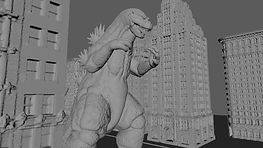
(More Greyscale process images to come! I know I have them somewhere.)
We were able to use a completely different mesh to guide the animation. We used AI.. to use my animation keys and layer on the character we created -- no need to re-rig a different mesh!
It's not a workflow I would suggest for high end stuff, but for certain needs, and certain clients, it can be useful!